Anuglar - Service and Repository Pattern with Dependency Injection
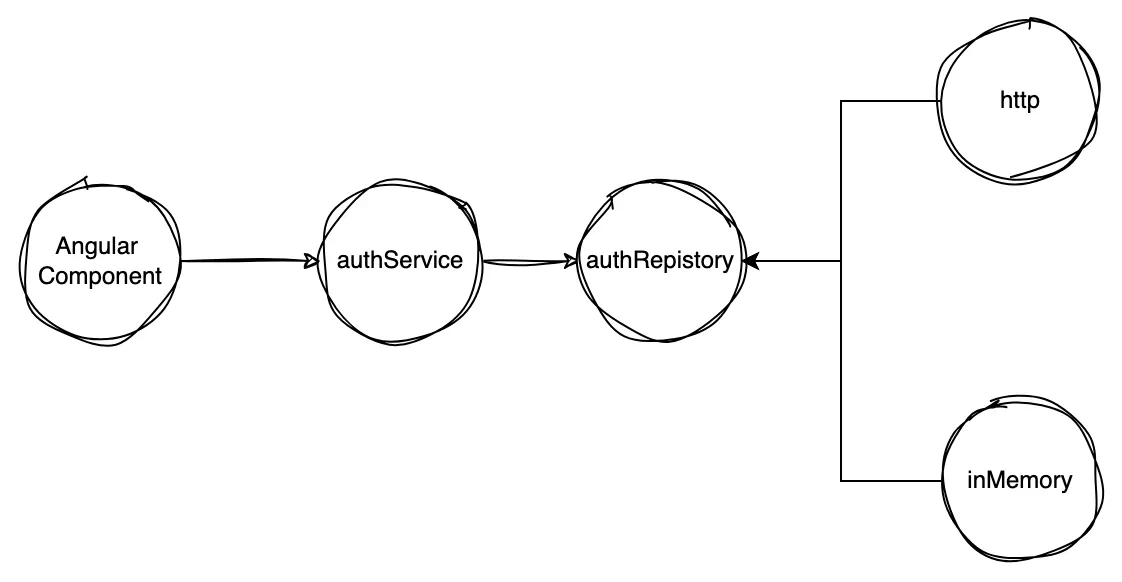
The idea of this example is to implement a service and repository architecture, where the repository has multiple implementations that are transparent to the service, all this using the dependency injection and inversion structure proposed by Angular, managing to keep the layers separate from our application using domain driven design.
Domain layer
export default abstract class AuthRepository {
  abstract login(email: string, password: string): Promise<boolean>;
}
Application layer
import AuthRepository from '../domain/authRepository';

export default class AuthService {
  constructor(readonly repository: AuthRepository) {
    this.repository = repository;
  }

  async login(email: string, password: string) {
    const isLogged = await this.repository.login(email, password);
    return isLogged;
  }
}
Architecture layer
import AuthRepository from '../domain/authRepository';

export default class AuthInMemoryRepository extends AuthRepository {
  private users = [{ email: 'test@email.com', password: '123456' }];

  async login(email: string, password: string): Promise<boolean> {
    const matchUser = this.users.find((u) => u.email === email && u.password === password);
    return matchUser !== undefined;
  }
}
The next step is to use Angular injectToken to achieve dependency inversion and construction of the service, avoiding the implementation of the repository.
./tokens.ts
import { InjectionToken } from '@angular/core';
import AuthRepository from '../domain/authRepository';

export const AUTH_REPOSITORY_TOKEN = new InjectionToken<AuthRepository>('AuthRepository');
The last configuration step would be to tell Angular how to build our instances and what classes to use in dependency inversion.
./app.module.ts
import { NgModule } from '@angular/core';
import { BrowserModule } from '@angular/platform-browser';

import { FormsModule, ReactiveFormsModule } from '@angular/forms';
import AuthService from 'src/core/application/authService';
import AuthInMemoryRepository from 'src/core/architecture/authInMemoryRepository';
import { AUTH_REPOSITORY_TOKEN } from 'src/core/architecture/tokens';
import AuthRepository from 'src/core/domain/authRepository';
import { AppRoutingModule } from './app-routing.module';
import { AppComponent } from './app.component';

@NgModule({
  declarations: [AppComponent],
  imports: [BrowserModule, AppRoutingModule, FormsModule, ReactiveFormsModule],
  providers: [
    {
      provide: AUTH_REPOSITORY_TOKEN,
      useClass: AuthInMemoryRepository,
    },
    {
      provide: AuthService,
      useFactory: (authRepository: AuthRepository) => {
        return new AuthService(authRepository);
      },
      deps: [AUTH_REPOSITORY_TOKEN],
    },
  ],
  bootstrap: [AppComponent],
})
export class AppModule {}
to finish we just import the service in our component and angular automatically injects the implementation of the repository.
./app.component.ts
import { Component } from '@angular/core';
import { FormControl, FormGroup, Validators } from '@angular/forms';
import AuthService from 'src/core/application/authService';

@Component({
  selector: 'app-root',
  templateUrl: './app.component.html',
  styleUrls: ['./app.component.css'],
})
export class AppComponent {
  constructor(private service: AuthService) {}
  public form = new FormGroup({
    email: new FormControl('', [Validators.required, Validators.email]),
    password: new FormControl('', [Validators.required]),
  });
  async onSubmit() {
    const { email, password } = this.form.value;
    if (email && password) {
      const isLogged = await this.service.login(email, password);
      alert(isLogged ? 'Logged' : 'Not logged');
    }
  }
}
Pero compartir no es inmoral –es un imperativo moral. Sólo aquellos que están cegados por la codicia se negarían a hacerle una copia a un amigo. -Aaron Swartz